Tracking payments
Running the poker is the easy part. Working out at midnight who paid, who said they would pay later, and who is owed what is where evenings go wrong.
UHT tracks money in and money out from pre-registration through to settling up.
Turning it on
Track Payments is a toggle, and it appears in every place players are listed:
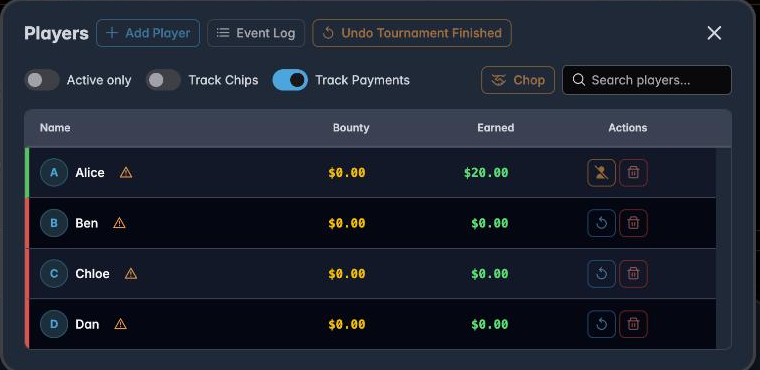
Switch it on and a payment state attaches to each player. Switch it off and UHT stops asking — appropriate for a game where everyone pays cash at the door and nobody is tracked.
Recording payment before the game
If you are pre-registering players, you can record payment as it arrives — a bank transfer during the week, cash at the last game:
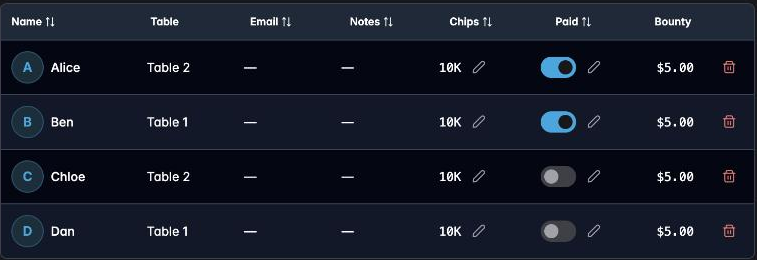
Each row has a Paid toggle. The counters at the top keep score:

Paid 2 / 4 — two of four registered players have settled. That single figure is what you check before you leave for the venue.
Note that the Prize Pool counts registrations, not payments. Somebody registered but unpaid is still in the field and still in the pool; they simply owe you.
During the tournament
Unpaid players are marked in the player list:

The amber ⚠ means this player has not paid. Ben has settled; Dan has not.
It is deliberately visible without being obstructive — you are not blocked from busting an unpaid player or paying them out, because in a real game people do settle late. But when they walk past the desk, the marker is there.
You can toggle payment at any point during play. Someone who arrives with cash after the first level is marked paid on the spot.
Settling up at the end
This is where it pays off. When the tournament finishes, the standings dialog has a Payment Overview:
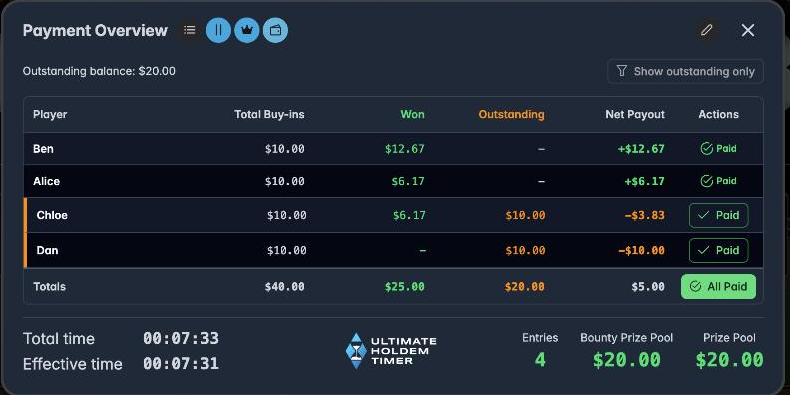
One line per player, and one number that matters:
| Column | Meaning |
|---|---|
| Total Buy-ins | Everything they owe you — entry, re-entries, rebuys, add-ons |
| Won | Prize money and bounties |
| Outstanding | Buy-ins they never actually paid |
| Net Payout | What changes hands now: positive means you pay them, negative means they pay you |
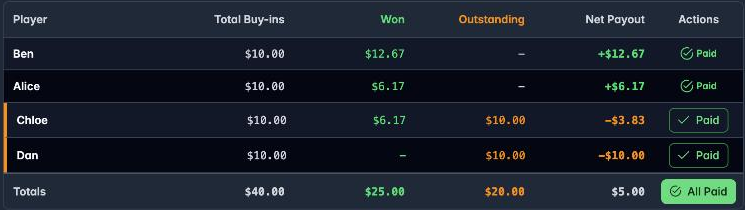
Reading the example:
- Ben paid his $10 and won $12.67 → +$12.67, you hand him that.
- Alice paid her $10 and won $6.17 → +$6.17 to her.
- Chloe never paid her $10 and won $6.17 → −$3.83. She owes you the difference.
- Dan never paid and won nothing → −$10.00. He owes you the buy-in.
The Outstanding balance at the top is the total still uncollected, and the Totals row reconciles the night.
Each row has a Paid button, and there is an All Paid at the bottom. Press them as money changes hands and the outstanding balance falls to zero — at which point the evening is genuinely finished.
Show outstanding only filters to the people you still need to find, which is the only list you care about by that stage.
Why net payout is the number to use
The temptation is to settle gross: collect every buy-in, then pay every prize. That means handling the money twice and gives four opportunities to make a mistake.
Net payout does the arithmetic for you. Chloe does not pay $10 and receive $6.17 — she hands over $3.83 and the matter is closed.
Rake and payments
If you charge a rake, the buy-in figures here include it, because that is what players actually pay. The prize pool excludes it. The difference between the two is your fee, and a tournament report totals it for the event.
Practical advice
Decide your policy before the game, not during it. "Pay at the door" and "settle at the end" are both workable. Mixing them is what produces the awkward conversation.
Mark payments as they happen. The toggle takes a second at the time and is guesswork an hour later.
Show players the overview. Turning the screen round and pointing at their net payout line ends most disputes before they start, because the arithmetic is visible.
Clear the outstanding balance before closing. Once it reads zero you know nothing has been missed — which is a much better basis for going home than a vague feeling that it probably balanced.
Next
- Pre-registering players — recording payment in advance
- Managing players — buy-ins, re-entries and add-ons
- Tournament reports — the permanent financial record