Tournament events
Everything that happens during a tournament is recorded as an event: a player entering, a knockout, a bounty being collected, an add-on, the tournament starting and finishing.
This is not a side feature. The event log is the tournament. UHT does not store "the prize pool is $240" as a number — it stores the entries that produced it and works the total out from them. The same applies to player counts, bounties, earnings and final standings.
That design has one very practical consequence: if you record something wrong, you fix the event, and every figure that depended on it corrects itself.
Opening the log
The event log lives in the Players dialog, in the tournament controls:
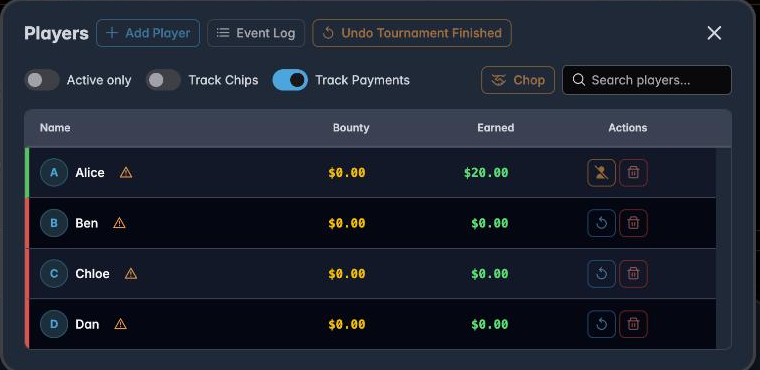
Press Event Log:
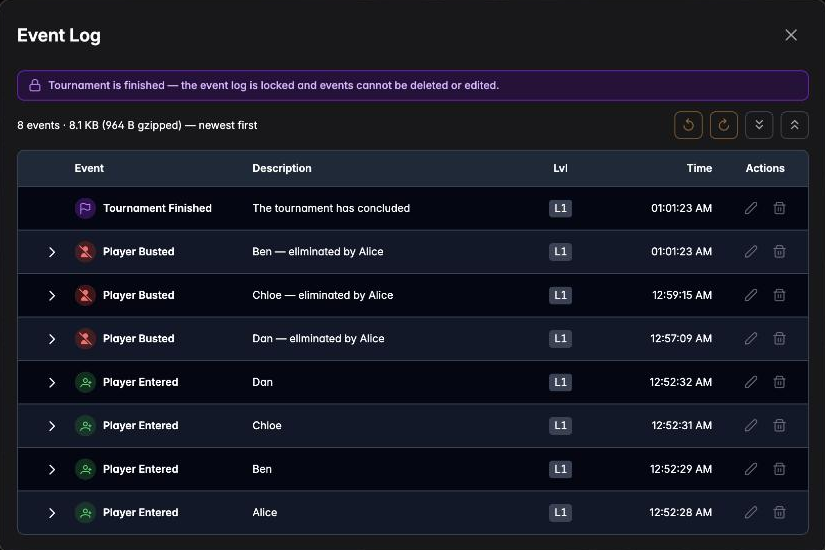
Newest first. Each row carries:
- Event — what kind of thing happened
- Description — who it involved, and who eliminated them
- Lvl — which level it happened on
- Time — when
- Actions — edit and delete
The line above the table tells you how many events there are and how much space they occupy
— 8 events · 8.1 KB (964 B gzipped). That matters more than it looks: a long tournament
with many players produces a large log, and the log is what syncs to your account.
What gets recorded
| Event | When it happens |
|---|---|
| Tournament Started | You press start |
| Player Entered | Somebody buys in |
| Player Re-entered | A re-entry or rebuy |
| Player Busted | A knockout — with who did it, when Track Knockouts is on |
| Player Add-on | Somebody takes an add-on |
| Bounty Awarded | A bounty is collected |
| Bounty Changed | A player's own bounty changes (progressive formats) |
| Prize Awarded | Prize money assigned to a finishing position |
| Prize Pool Changed | The pool total changes |
| Tournament Finished | The last player is out, or a deal ends it |
You never create these by hand in normal use. Adding a player creates the entry event; busting a player creates the knockout, the bounty award and the prize award together.
Correcting a mistake
This is what the log is for on the night. Two common cases:
You credited the wrong eliminator. A name is called out, you record it, and it turns out to have been the player sitting next to them. Find the Player Busted row and press the pencil. Change the eliminator and save — the bounty moves from one player to the other, and both players' earnings update.
You recorded something that did not happen. A player was marked busted while they were still in the hand. Press the bin on that row. The player returns to the field, their bounty comes back, and the counts correct themselves.
For the mistake you just made, the Players dialog has Undo Bust at the top — one press, no dialog. Use the event log for mistakes you notice later.
Editing an event
The pencil opens an editor for that event. What you can change depends on the kind of event — a knockout lets you change the eliminator and the level; an entry lets you correct the player and the timing.
Two things are worth knowing before you edit:
Order matters. Events are replayed in sequence to reconstruct the tournament. Editing the level an event occurred on changes where it sits in that sequence, which can change what came after it.
Downstream figures move. Deleting an entry does not just remove a name — it removes the buy-in from the prize pool, and the prizes recalculate. That is the correct behaviour, and it is worth a moment's thought before deleting something from the middle of a busy evening.
The log locks when the tournament finishes
Once a tournament is over, the log is sealed:

Tournament is finished — the event log is locked and events cannot be deleted or edited.
This is deliberate. A finished tournament is a settled record: people have been paid on the strength of it, and a tournament report may have been generated from it.
If you genuinely need to correct something after the fact, Undo Tournament Finished in the Players dialog reopens the tournament. Make the correction, then finish it again.
Correcting a finished tournament
There is a second route that does not reopen the tournament. The final standings dialog carries a pencil in its header; it opens the same event log in a restricted editing mode, marked by an amber banner:
Editing a finished tournament — fix elimination order or values. Entries, start and finish are locked.
Eliminations, bounties, prizes and chip events can be corrected here. What cannot be touched is the frame of the tournament: Tournament Started, Player Entered and Tournament Finished stay locked, so the field and the dates of a settled event cannot be rewritten.
When the outcome moves
Closing the log after an edit that changed the result opens a summary of what changed:
- how many players finished differently, were added to the standings, or dropped out of them
- the updated standings, with the old value struck through in every cell the edit moved
The reason it asks at all is that a finished tournament has already written a line to each participant's player results, and those still hold the numbers from before your edit. Three answers:
| Button | What happens |
|---|---|
| Apply & update | Saves the tournament and rewrites the result on every participating player account |
| Apply only | Saves the tournament; player accounts keep the results they already have |
| Cancel | Discards the edit entirely and restores the tournament exactly as it was |
Apply & update is almost always the one you want — it is the whole point of correcting the record. Apply only exists for the edit that fixes a cosmetic detail you do not want propagating to everyone's history.
The dialog appears only where there is something to keep in sync: you are signed in, and the tournament is stored on your account. A local-only tournament, or a mirrored display, saves the edit and says nothing.
Why this matters for multi monitoring
Connected displays stay in step by exchanging events, not by copying whole tournaments. When you bust a player on your phone, the phone sends that one event and every screen replays it.
That is why the counts on a TV correct themselves after a brief connection drop: the missing events arrive and are replayed. See Multi monitoring.
Practical advice
Record knockouts as they happen. Reconstructing an hour of eliminations from memory at the end is far harder than tapping a name at the time, and bounty amounts depend on the order.
Do not delete to "clean up". The log is not clutter; it is the tournament's arithmetic.
Check the log before generating a report. Anything you correct is reflected in the PDF — but only if you correct it first. See Tournament reports.
Next
- Managing players — the day-to-day actions that create events
- Chopping the prize pool — a deal is recorded as an event too
- Tournament reports — the log as a permanent record