Something not working?
Most problems fall into a handful of buckets. Work down this page — the fixes near the top solve the majority of them.
The first thing to try
Reload the page. UHT runs in your browser, and a tab left open for several hours can occasionally get into an inconsistent state. Your tournament is saved; reloading does not lose it.
If a display is stuck in fullscreen, press Esc first, then reload.
My tournament has disappeared
Are you on the same device and browser? Without an account, tournaments live in the browser you created them in. They don't follow you to your phone, and they aren't in a different browser on the same computer.
Did you clear your browsing data? "Clear site data" deletes tournaments, designs and chip sets. There's no copy on our side to restore from, because we never had one.
Check the right tab. The tournament overview has four: Configurations (setups you saved), Planned (created but not started), Active (running now) and Finished. A tournament you started yesterday is under Finished, not Configurations.
To stop this happening again, create a free account — your work then syncs and survives.
The clock isn't showing something I set up
Usually this isn't a fault: the design you picked simply doesn't display that thing.
Designs are built from different components. One shows chip denominations and bounties; another has no room for them. If you configured something the design can't draw, UHT tells you on step 8 of the wizard, and the tournament runs perfectly normally either way — the information just isn't on screen.
Two fixes: pick a different design, or add the missing piece to your own design in the display designer.
A second screen won't connect
Work through these in order:
- Is multi monitoring actually enabled for this tournament? It's off by default.
- Are you over the device limit? Free connects 2 devices, Supporter 5. UHT says so when you hit it. Close a browser tab you're no longer using.
- Are you already hosting another tournament? Free and Supporter allow one multi-monitor tournament at a time. Disable it on the old one first.
- Both devices need internet. Multi monitoring goes via UHT's servers — two devices on the same wifi with no internet won't find each other.
Full detail in Multi monitoring.
A connected screen is slow or keeps dropping out
There are two built-in tests, and they answer different questions.
Is one screen worse than the others?
Open the Connected Displays dialog from the tournament controls and press Test Connection. It measures how responsive each connected device is, so you can see whether one particular screen is struggling rather than guessing.
Is this device's connection healthy at all?
Add /conntest to the end of the address you're already on. If the display is at
https://uht.app/display/1234
then go to
https://uht.app/display/1234/conntest
UHT runs a full diagnostic on that device and shows you the result:
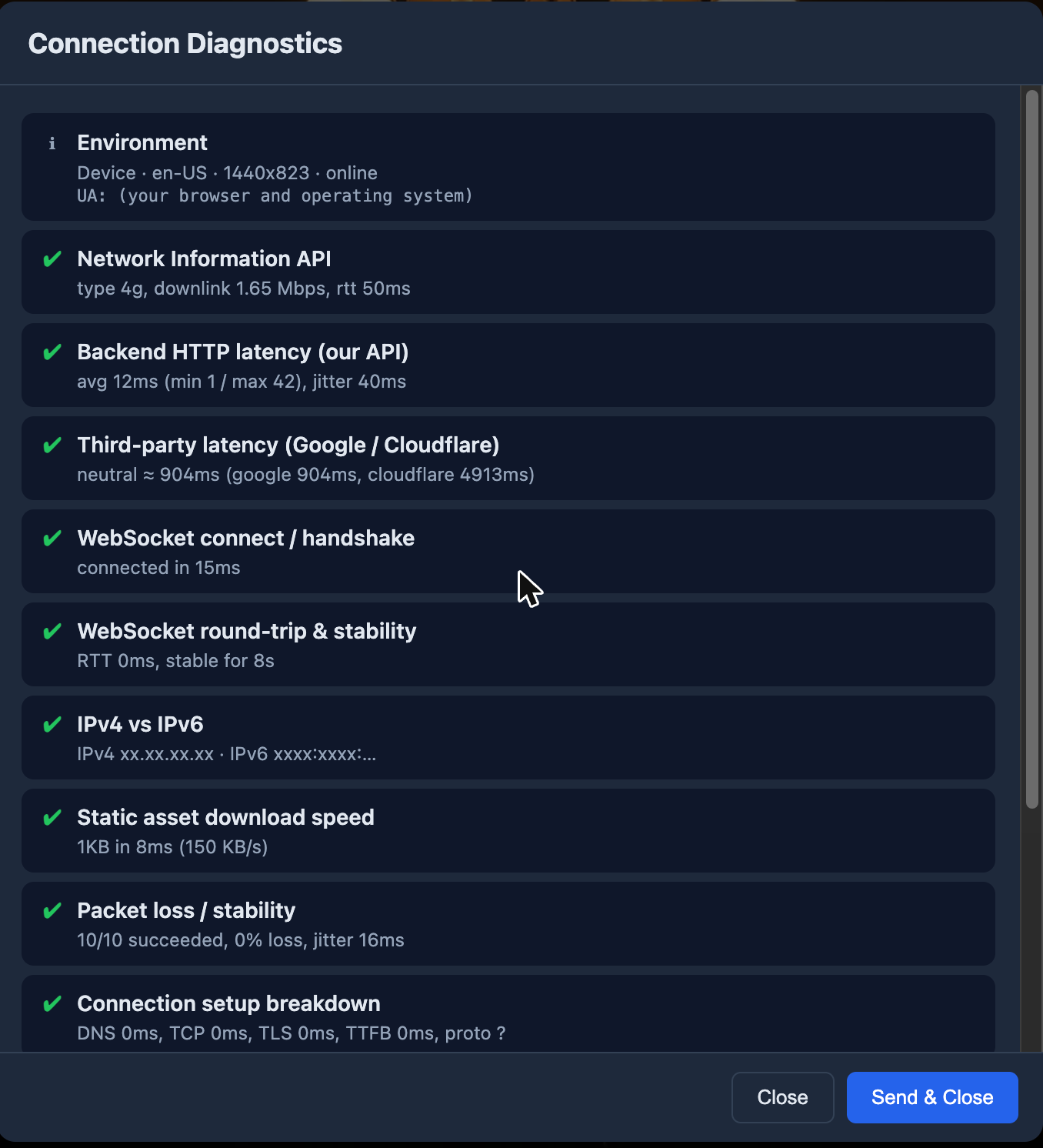
It checks the connection to UHT's servers, the WebSocket link that keeps screens in sync, round-trip times, packet loss, download speed and more. A green tick on every row means the connection is fine and the problem is elsewhere.
Run it on the device that's misbehaving, not on your laptop — it tests the connection of whatever device it's open on. If the TV is the one dropping out, run it on the TV.
Press Send & Close to send us the results. That's by far the most useful thing you can
give us for a connection problem: it contains the actual measurements rather than a
description of the symptoms.
Common causes of a laggy screen:
- Weak wifi where the TV is. Smart TVs often have poor aerials. A cheap streaming stick usually connects better than the TV's own browser.
- An old device. Ageing smart TVs run very old browsers. If one screen is slow and the others are fine, that's your culprit.
- Too much on screen. A design packed with animated effects costs more to draw. Try a simpler design on the weak device — with mirroring switched off, only that screen changes.
In the same dialog you can rename devices so you can tell them apart, refresh a single screen remotely, and use Identify All Displays to work out which physical TV is which.
Sending us the information we need
If you can't fix it and want us to look, two things make an enormous difference.
Debug mode
In the Connected Displays dialog, each device has a Reload in Debug Mode action. It reloads that screen with extra logging switched on, so the next time the problem happens we can see what actually went wrong rather than guessing.
Turn it on for the device that's misbehaving, reproduce the problem, then tell us.
Debug mode is per-device. Enabling it on the TV doesn't put your phone into debug mode.
Writing to us
Send a mail to contact@ultimate-holdem-timer.com describing what happened.
Please include:
- What you were doing when it went wrong — "pressed start on the second level" beats "the timer broke"
- Which device and browser — "Samsung TV browser" and "iPhone, Safari" are very different situations
- Whether multi monitoring was on
- Whether it happens every time or happened once
That's usually enough for us to find it without any back-and-forth.
Problems and quick answers
The timer keeps running during a break. Breaks are levels in the structure. Check step 4 of the wizard — a break row should sit between the levels where you want it.
Sounds don't play. Browsers block audio until you interact with the page. Click anywhere on the display once. If a button appears asking you to enable sound, press it.
Spoken announcements are silent. Announcements must be enabled in wizard step 9. Also check the device supports speech — some older TV browsers don't. UHT tells you if the current device can't do it.
The prize pool looks wrong. If bounties are on, part of every buy-in goes to bounties instead of the prize pool. That's the split working as intended — see Bounty tournaments.
I can't add any more players. That's the plan limit: 10 on Free, 50 on Supporter, unlimited on Commercial. See Pricing.
UHT refuses to save anything — designs, configurations, a new tournament. Your storage is full. The Account Storage meter under Settings → Account tells you how much you're using and which category is responsible. See Free up space.
My chips aren't on the display. Two possibilities: the chip values are still zero (only chips worth more than nothing are shown), or the design has no chip component. See Import your chips.
Everything is tiny on the TV. Use the fullscreen button on the display's control bar. Most designs are built for a full screen and look cramped in a windowed browser.
Still stuck?
- The YouTube channel has walkthroughs of the more involved features.
- Mail contact@ultimate-holdem-timer.com with the details listed above.