Pricing
UHT is free, and the free version is a real product — not a trial that nags you. No ads, no trackers, no account needed. Most home games never need anything else.
You only pay when your tournaments outgrow the free limits, or when you're running poker as a business.
The three plans
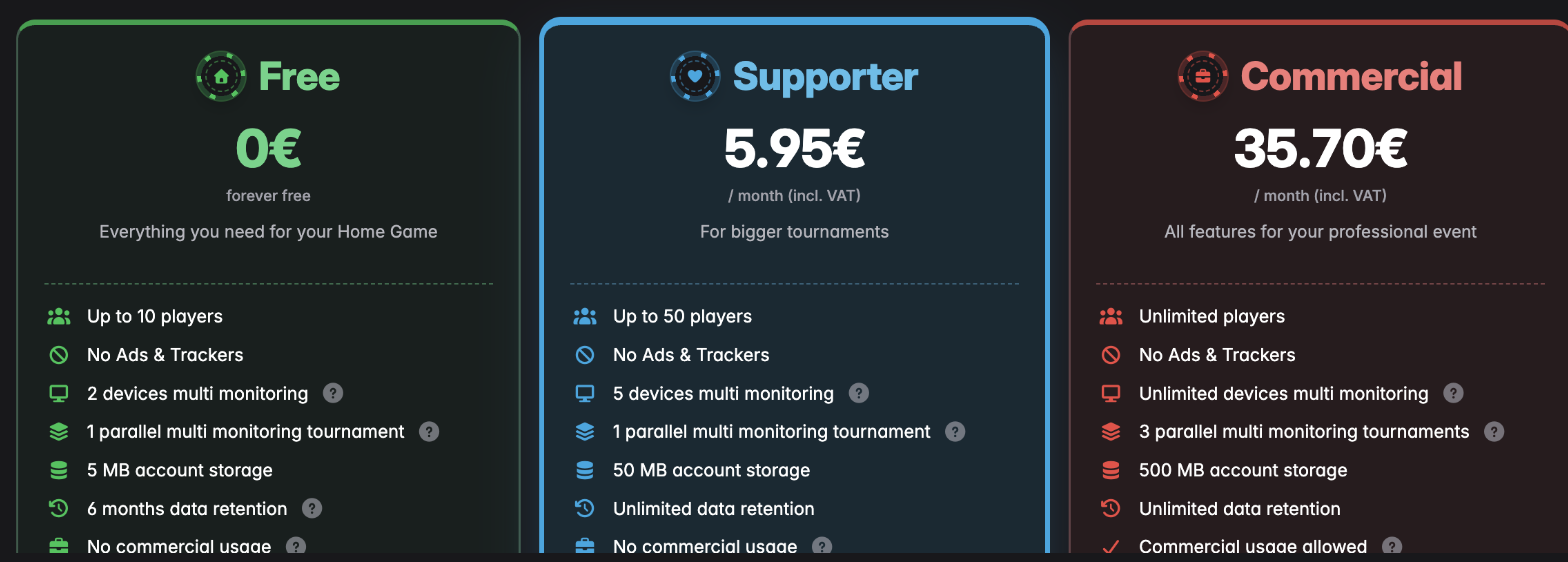
| Free | Supporter | Commercial | |
|---|---|---|---|
| Price | Free forever | 5 € / month · 50 € / year | 30 € / month · 300 € / year |
| Players | Up to 10 | Up to 50 | Unlimited |
| Screens for multi monitoring | 2 devices | 5 devices | Unlimited |
| Tournaments at once (multi monitor) | 1 | 1 | 3 |
| Account storage | 5 MB | 50 MB | 500 MB |
| Data kept | 6 months | Forever | Forever |
| Ads & trackers | None | None | None |
| Commercial use | No | No | Yes |
| Collect rake | – | – | Yes |
| Tournament reports | – | – | Yes |
The figures above are the net prices, before tax. UHT adds the VAT rate of whichever country you're in, so what you actually pay is a little higher — and different from country to country.
For example, at Germany's 19% VAT, Supporter comes to 5.95 € a month rather than 5 €.
Pick your country from the Country dropdown at the top of the pricing window and it shows your real, tax-inclusive price before you commit to anything.
Which one do I need?
Stick with Free if your games are up to ten people round a kitchen table. You get the timer, the blind structures, the display designer, custom chips, bounties, sounds — the lot. The only real limits are the player count and how long UHT keeps your finished tournaments.
Go Supporter if your game has grown past ten players, or you want your tournament history kept indefinitely instead of for six months. It also lets you drive five screens instead of two.
Go Commercial if you run poker as a business — a club, a pub league, a charity event someone is paying you to run. Beyond unlimited players, it's the only plan that permits commercial use, lets you take a rake, and produces tournament reports. It also runs three separate multi-monitor tournaments at once, which matters if you have more than one room going.
Start free. You can upgrade at any moment, including halfway through an evening — the limit is checked when you add players, not when you create the tournament.
Paying monthly or yearly

Switch between Month and Year at the top of the pricing window. A year costs the same as ten months, so you save two months by paying annually — Supporter is 50 € for the year instead of 60 €, Commercial 300 € instead of 360 € (net, before your local VAT).
Next to that is a Subscription switch:
- Off — you buy a licence that runs out on its own. Nothing renews, nothing is charged again. Buy another one whenever you feel like it.
- On — it renews automatically until you cancel.
If you already hold a licence and buy the same one again, the time is added to what you have rather than replacing it.
How to upgrade
- Click Pricing in the top bar of the app.
- Choose Month or Year, and decide whether you want it to auto-renew.
- Check the Country dropdown shows where you actually are — it sets your VAT.
- Click the plan you want, then follow the checkout.
Your new limits apply immediately. Nothing needs restarting, and tournaments already in progress pick up the change straight away.
Checking, changing or cancelling your plan
Everything about your licence lives in Settings → License.
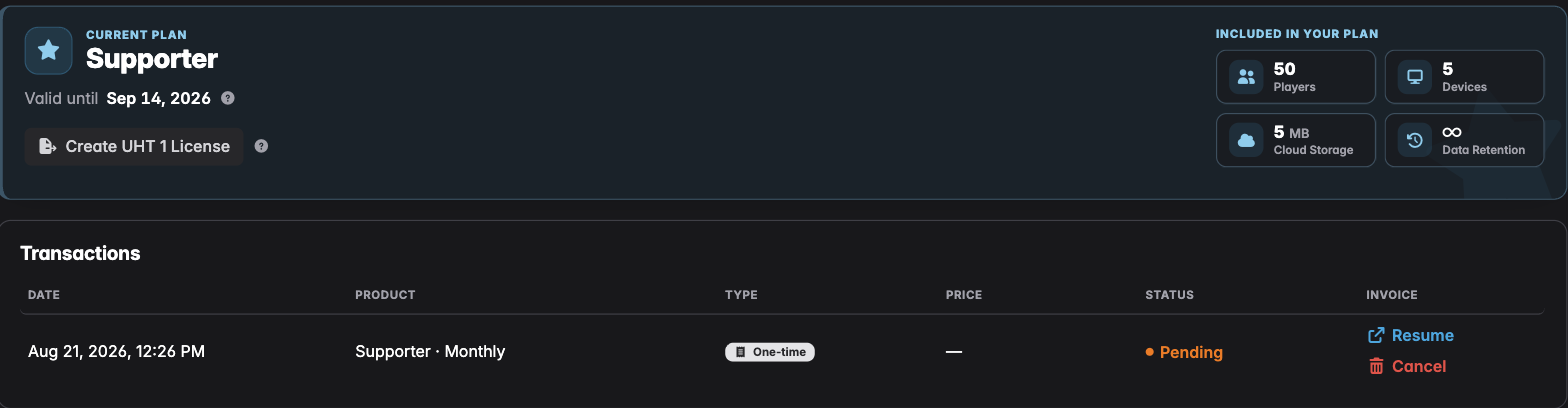
Current plan shows which plan you're on and the date it runs until. Included in your plan is a quick reminder of your limits — players, connected devices, cloud storage and how long finished tournaments are kept.
Underneath, Transactions lists every purchase you've made. That table is purely informative — it's your history, and the place to grab a receipt for any payment. You don't cancel anything from it.
Cancelling a subscription
If you're on an auto-renewing subscription, the Manage subscription button sits just under your renewal date. Press it and UHT opens the Stripe customer portal in a new tab — Stripe is who actually handles the payment, so that's where the subscription lives.
In that portal you can:
- Cancel the subscription, so it stops renewing
- Update your payment details if your card has changed
- Download receipts and invoices
Cancel it there, come back, and the License tab will show that your plan is set to end rather than renew. Changed your mind? Manage subscription again and re-enable it — right up until the date it lapses.
Two things worth being clear about:
- Cancelling is not a refund, and it isn't instant. Your plan keeps working until the date shown under Valid until. You paid for that period and you keep it.
- Nothing is deleted when it lapses. You drop back to the Free plan's limits — 10 players, 2 devices, and finished tournaments kept for six months. Your designs, configurations and chip sets stay where they are.
If you bought a one-off licence rather than a subscription, there's nothing to cancel: it simply expires on its own.
Resume appears next to a payment that hasn't completed — for example if you closed the checkout window part-way. It picks that payment back up rather than starting a new one.
Questions people actually ask
Do I need an account to use UHT? No. Everything runs in your browser without one. An account gets you sync across devices, backups and a few other conveniences — see UHT account benefits.
What happens to my tournaments if I stop paying? Nothing is deleted while your licence is valid. On the Free plan, finished tournaments are kept for six months; paid plans keep them indefinitely.
How do I cancel? Settings → License → Manage subscription, then cancel in the Stripe portal that opens. Your plan runs until the paid-up date, then stops. See above.
Is the player limit per tournament or in total? Per tournament. Ten players on Free means ten in one tournament — you can run as many tournaments as you like.
Can I use the free version at my pub's poker night? If money changes hands or you're being paid to run it, that's commercial use and needs the Commercial plan. A private game among friends, even one with a buy-in, is not.
Still stuck? Something not working? has the troubleshooting steps.