Managing players
Player management is where you spend most of a tournament. Everything else — the clock, the blinds, the display — runs itself once configured; players arrive, buy in, get knocked out and want paying.
Player tracking is enabled in step 6 of the tournament wizard (Track Players & Bounties). Without it, UHT counts entries as a number and there is nothing to manage. Turn it on if you want names, bounties, tables or payment tracking.
Track Players, and Track Knockouts
Step 6 of the wizard holds two switches:
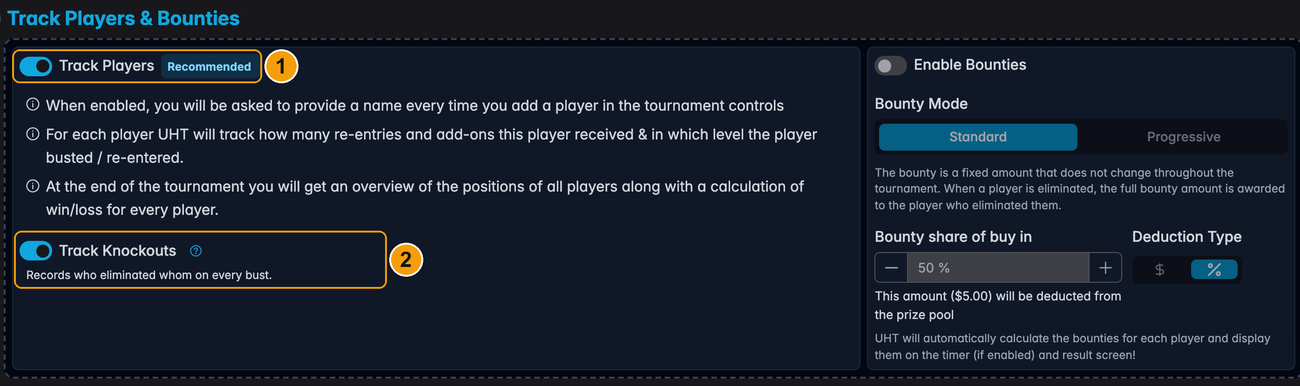
1 — Track Players. Names instead of a headcount. Everything on this page depends on it.
2 — Track Knockouts. Whether a bust also records who did it. On by default, and worth leaving on: it is what fills the Eliminated by column in the event log and the report, counts each player's scalps, and feeds the Players eliminated figure in their statistics.
Turn it off for a game where nobody is counting knockouts. The bust dialog then becomes a plain confirmation — one tap per elimination instead of a tap and a name — and the columns that would have been empty are dropped from the event log and the PDF report.
Two things decide it for you:
- Bounties. A bounty is paid to a person, so switching bounties on pins knockout tracking on and hides the switch until you switch them off again.
- An open lobby. A tournament with a public registration lobby cannot turn Track Players off at all — every registration arrives as an individual player. The step says so and the switch is disabled until the lobby is closed.
The Players dialog
Open the tournament controls and press Players:
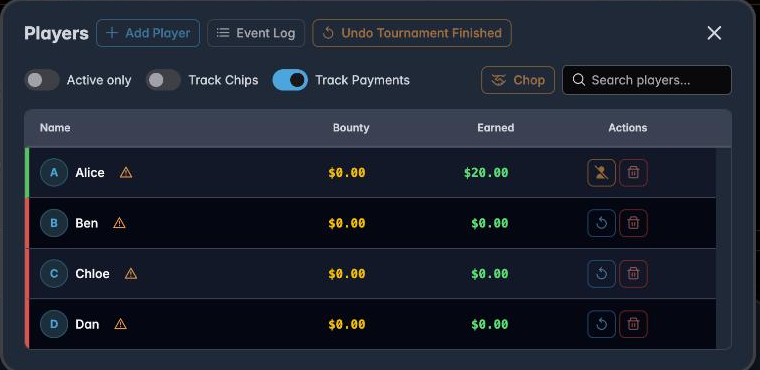
Everything lives here. Across the top:
- + Add Player — a new buy-in
- Event Log — the full record, and where you correct mistakes; see Tournament events
- Undo … — reverses the last action, labelled with what it will undo
- Chop — split the remaining pool; see Chopping the prize pool
And three toggles that change what the list shows:
- Active only — hides eliminated players. Useful late on when two-thirds of the list is struck through.
- Track Chips — adds a chip-count column, so you can record stacks. Needed for a chip or ICM chop, and for the Chip Stack Leaders display component.
- Track Payments — adds payment state; see Tracking payments.
Adding players
+ Player in the controls, or + Add Player in the dialog:
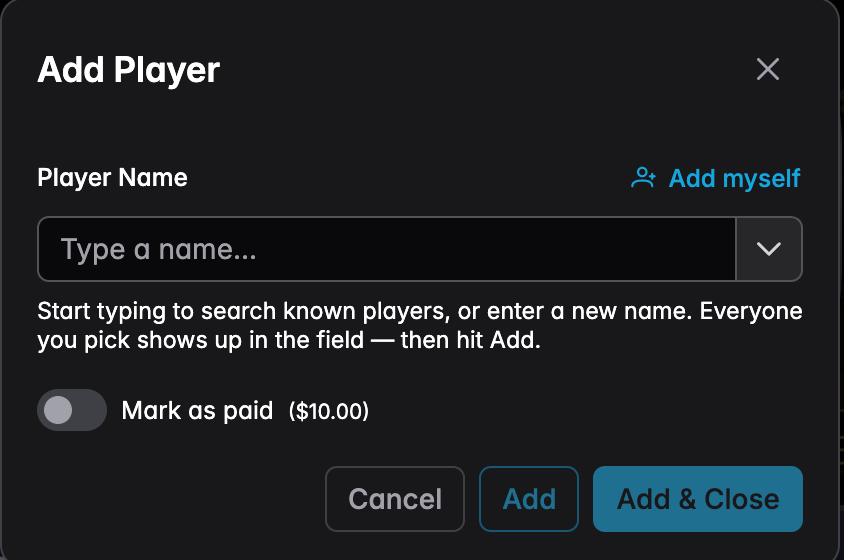
Type a name. UHT suggests players you have had before, so regulars are a single tap and their name is spelled the same way every time.
Mark as paid records that they have handed over the buy-in — useful when somebody says they will settle later.
Add keeps the dialog open for the next person; Add & Close finishes. At a busy registration desk, Add repeatedly is much faster than reopening the dialog.
Every player added creates an entry event, which raises the prize pool and — in a bounty tournament — puts a bounty on their head.
The player list
Each row shows the player's name, their Bounty (what they are worth to whoever knocks them out) and their Earned total (what they have collected so far):
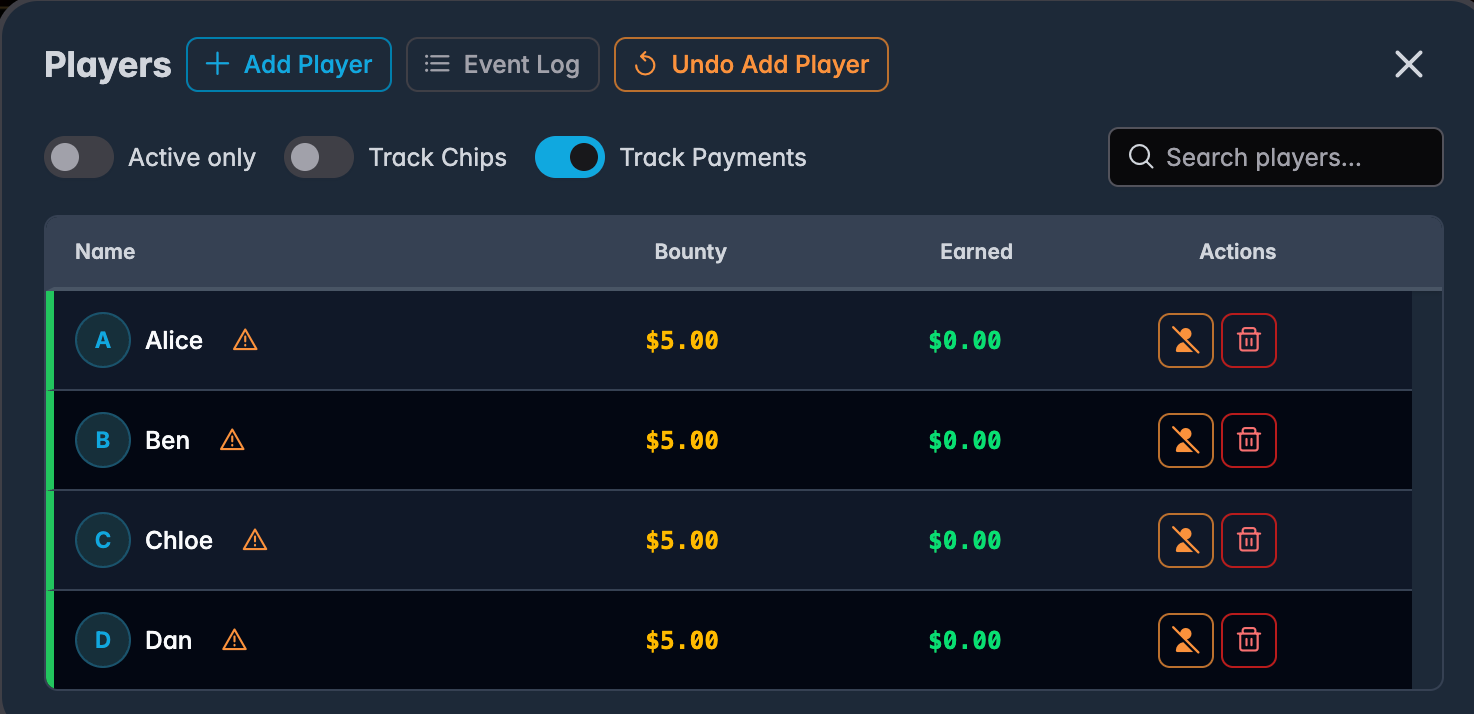
The coloured bar at the left of each row is their status: green for active, red for eliminated.
If tables are enabled, the list groups by table instead:
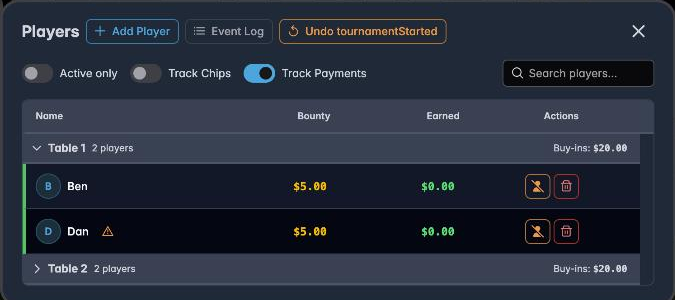
Each group is collapsible and shows its own player count and buy-in total. On a two-table game this is how you answer "who is left on table 2?" without counting heads. See Managing tables.
Knocking a player out
Press the bust button on their row:
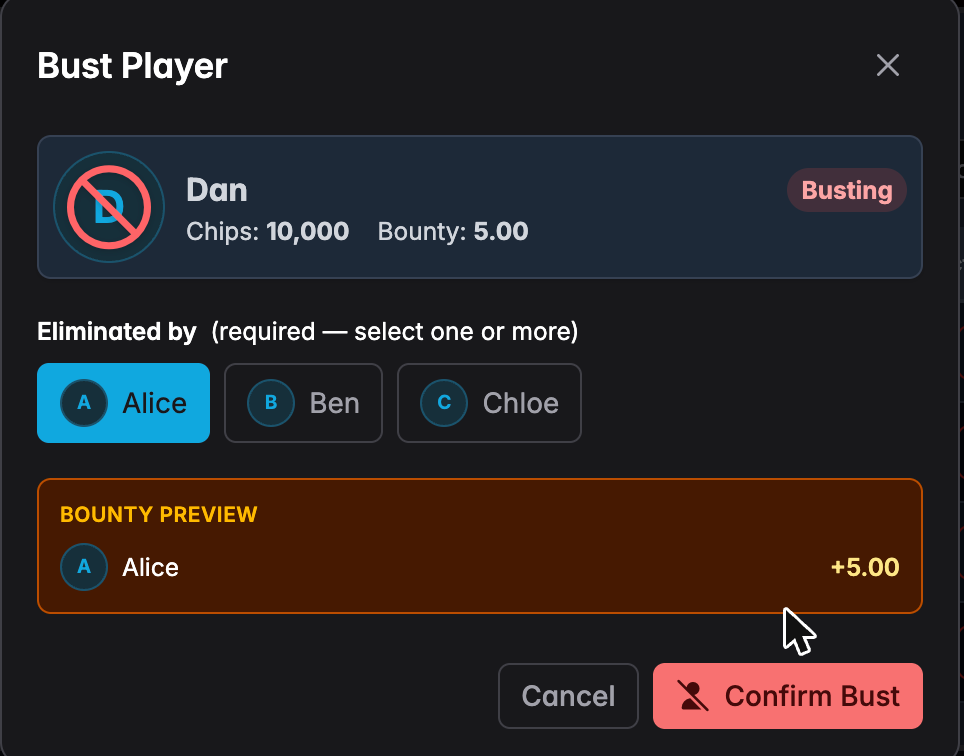
Eliminated by is required — pick who did it. UHT shows a bounty preview so you can see exactly what is about to be paid before committing.
You can select more than one eliminator. If two players got them all-in together, tap both and the bounty splits.
With Track Knockouts off, this part of the dialog is not there at all: the bust is a plain confirmation, and Confirm Bust is available immediately.
Press Confirm Bust:
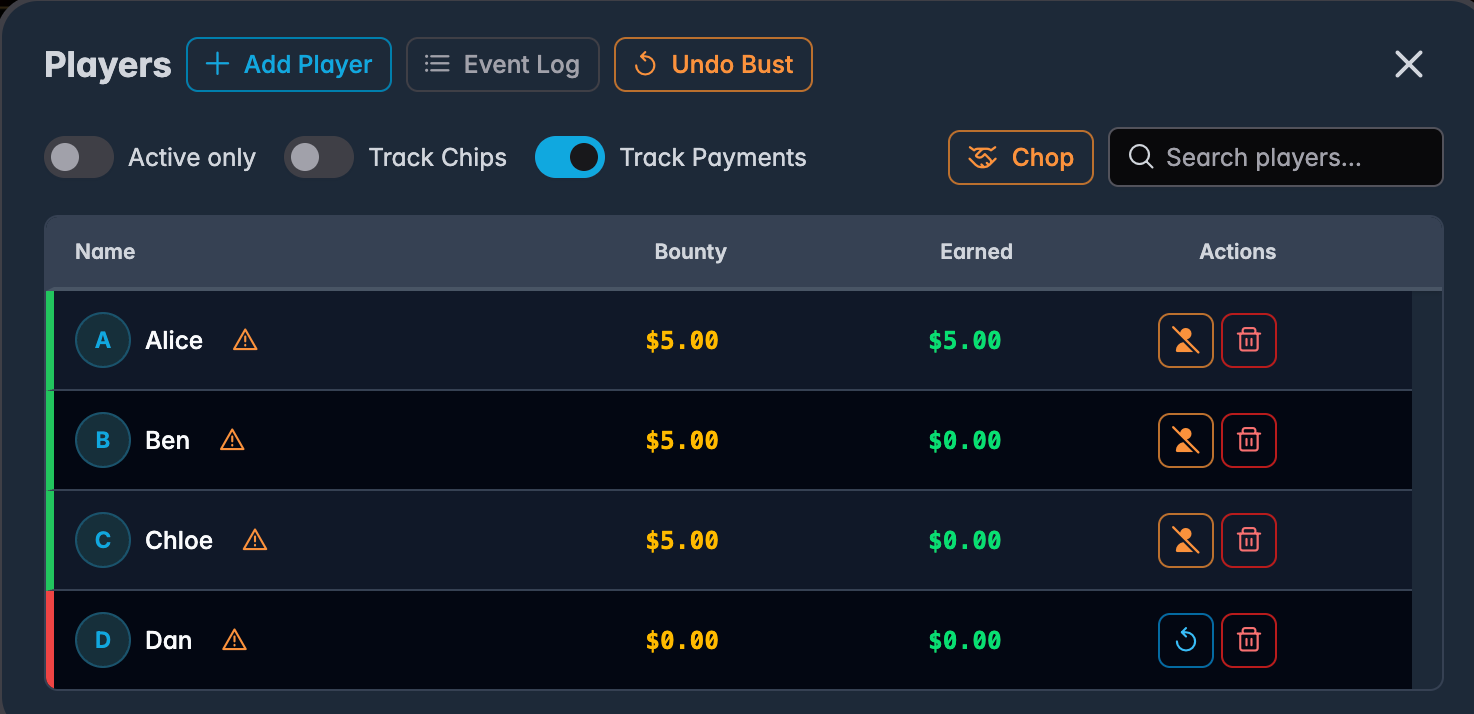
The busted player's row turns red, their bounty drops to zero, and the eliminator's Earned rises. Their finishing position is recorded, so prize money is assigned automatically if they finished in the money.
Got it wrong? Undo Bust at the top reverses it immediately.
Re-entries and rebuys
If the tournament allows them, an eliminated player's row offers a re-enter action instead of a bust action. Pressing it puts them back in with a fresh stack, adds their payment to the prize pool, and — in a bounty tournament — a new bounty on their head.
The distinction between the two:
- A re-entry is a new entry; the player counts as an additional entry in the field.
- A rebuy tops up an existing entry.
Which one applies is set in step 2 of the wizard, and UHT labels the action accordingly.
Removing a player
The bin on a row removes the player from the tournament entirely, as though they had never entered — the buy-in comes back out of the prize pool.
This is for correcting a mistake: somebody added twice, or added to the wrong tournament. It is not how you record a knockout. A removed player has no finishing position and does not appear in the standings.
Finding somebody
Search players… filters the list as you type. On a forty-player field this is far quicker than scrolling, particularly when you are trying to bust someone while three people talk at you.
When the tournament ends
When the last player is out, UHT shows the final standings:
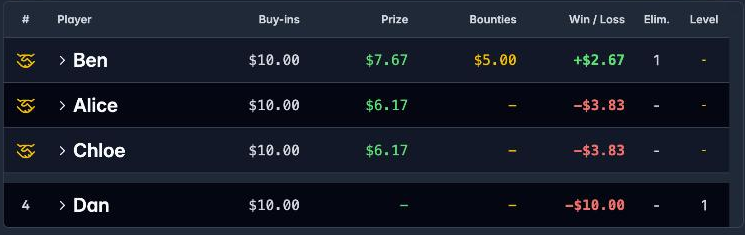
Every player's position, what they paid in, prizes, bounties, and whether they finished up or down. The small icons at the top of the dialog switch between views — a summary, the payout table, and the payment overview you settle up from.
Practical advice
One person on the phone. Player management is the job that goes wrong when two people do it at once. If you need helpers, connect a second device as a multi-monitor controller rather than passing the phone around.
Record knockouts immediately. Bounty amounts depend on the order eliminations happened in, and reconstructing an hour of them from memory is genuinely difficult.
Use Active only after the first break. A list of eight active players is much easier to work with than forty, thirty-two of them struck through.
Turn on Track Chips if a deal is even possible. Chip and ICM chops need counts, and collecting them under time pressure at 1 a.m. is unpleasant.
Next
- Managing tables — seating and table breaking
- Tracking payments — who has paid and who is owed
- Bounty tournaments — how bounties change the money
- Tournament events — correcting a mistake after the fact
- Player results and statistics — what UHT records once the night is over