Tournament options — the preview data
The designer works almost entirely in placeholders, and a placeholder on its own shows you nothing. So the designer runs against a sample tournament, and the sidebar lets you choose and shape it:
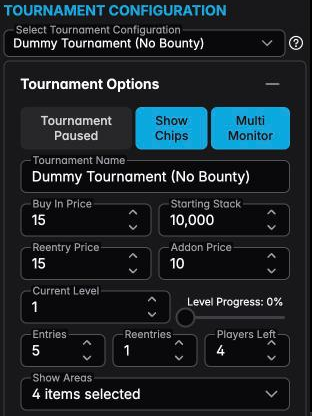
Select Tournament Configuration picks which of your saved setups supplies the sample data. Choose one with bounties and the bounty placeholders fill in; choose one without and they go quiet. That's the fastest way to check a design against the tournament you'll actually run.
Tournament Options underneath then lets you push that sample around without touching the real configuration:
- Tournament Paused, Show Chips, Multi Monitor — simulate those states, so you can see what your paused-state layer or your chip component actually looks like.
- Tournament Name, Buy In Price, Starting Stack, Current Level, Entries, Players Left, and the rest — type any value and the canvas redraws with it.
That last group is more useful than it looks. Set Entries to 3 and then to 137 and you'll find out immediately whether your player counter has room to breathe.
These options exist purely so the designer and the preview show believable values. The tournament configuration you selected is read, never written — you can set the buy-in to 9,999 here and your saved configuration is untouched.
This is also why a design can look sparse in the designer and full during a real tournament: components with nothing to show stay quiet, and what they show depends entirely on the sample you picked.