Do I need an account?
No. You can open UHT, build a tournament and run it tonight without ever telling us who you are. That isn't a crippled demo — it's the whole timer.
An account is free too, and it fixes one specific problem: without one, everything lives only in the browser you're using right now.
What works with no account
Practically all of it:
- Building tournaments, blind structures and prize distributions
- Running the clock, tracking players, paying out
- Bounties of every kind
- Importing your own chips
- The display designer, including your own designs
- Sounds and announcements
- All three calculators
You are not being upsold here. If you run a monthly game on the same laptop, you may never need anything more.
What you give up
Everything is stored in your browser's own storage. That has three consequences worth understanding before you spend an evening building a beautiful custom display:
It's tied to one browser on one device. Your tournaments don't appear on your phone. The design you made on the laptop isn't on the tablet you actually run the game from.
Clearing browsing data deletes it. Not just cookies — "clear site data" takes your tournaments, your designs and your chip sets with it. There's no undo and no copy on our side, because we never had one.
Some features genuinely need an account, because they involve another device or another person:
| Feature | Why it needs an account |
|---|---|
| Multi monitoring | The screens have to find each other through us |
| Sharing a tournament configuration | The other person has to be able to fetch it |
| Buying a licence | It has to be attached to somebody |
What an account adds
Signing up is free and takes a few clicks — Google, Microsoft or an email and password. Once you have one, the app gains a settings area:

Your work syncs. Designs, tournament configurations, chip sets, blind structures and sounds are stored on your account and follow you to any device you log into. Build a design on the desktop, run the tournament from the tablet.
It survives. Clearing your browser no longer costs you anything. Neither does a lost laptop.
You can share. Send a tournament configuration to a friend, or publish a display design for other organisers to use.
Multi monitoring works. The clock on the TV, control from your phone. See Multi monitoring.
Under My Content you can see everything you've saved in one list, and tidy up what you no longer want.
About storage space
Synced content uses space on your account, and each plan gets a different allowance — 5 MB on Free, 50 MB on Supporter, 500 MB on Commercial. You can see what you're using under Settings → Account:
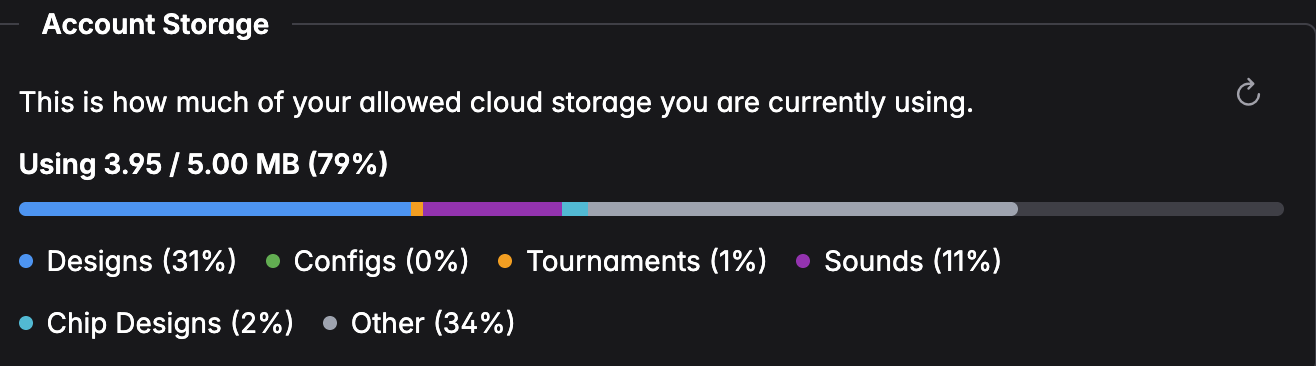
The breakdown tells you where the space went. In practice it's almost always designs and sounds — a display design with a few background images is far bigger than a hundred tournament configurations, and uploaded sound files add up fast.
If you run out, delete a design you no longer use, or upgrade. Text-only things like blind structures cost essentially nothing. Free up space walks through finding and deleting the big items.
Finished tournaments are kept for six months on the Free plan, and indefinitely on paid plans. Your designs and configurations aren't on that clock — they stay until you delete them.
So should I sign up?
Probably yes, if you run games on more than one device, you've put real effort into a custom design, you want a second screen, or you'd be annoyed to lose your setup.
Don't bother if you run the same game from the same laptop and would happily rebuild it from scratch.
You can also start without one and sign up later — but only what's in that browser at that moment gets uploaded. Sign up before the laptop dies, not after.
Next steps
- Pricing — what the paid plans add on top
- Multi monitoring — the main account-only feature
- Getting started — build your first tournament